.png)

Threat alert software
When employees, visitors or entire sites are at risk from violence, threats, aggressive individuals or other threatening situations, every second counts.
EVALARM enables fast, discreet or open alerting and supports organizations in informing emergency teams in a targeted manner, identifying the location of the incident in real time and coordinating measures in a structured way.


Why EVALARM in threat situations
EVALARM combines rapid alerting with precise information, clear processes, and optional control center support – exactly when it matters most.

Silent threat alarm or openly Alerting
Alert openly or discreetly, depending on the situation – with one click.

Triggering via emergency button, app or interface
Flexible triggering: stationary, mobile or automated via integrated interfaces

Real-time location
A building plan or GPS position immediately shows where help is needed.

Targeted alerting of relevant persons
Security service, crisis team, reception, control center or defined roles are automatically alerted.

Eskalation, Anweisungen und Dokumentation
Structure and manage the alarm process, coordinate measures, and document all steps completely.
Made & hosted in Germany - GDPR compliant - ISO 27001 certified processes
Silent alarm or open alarm – depending on the situation
Not every threat situation warrants a visible or audible alarm. In sensitive situations, a loud alarm can escalate the situation or further provoke an aggressive person.
Therefore, EVALARM supports both silent and overt alerting processes.

Silent alarm
Discreet background alerting without further escalating the situation.
Typical deployment situations:

Aggressive people at reception
Threat to individual employees
Assaults or threats
Discrete request for support

Openly Alarm
Active warning of people or areas with clear instructions for action.
Typical deployment situations:
Rampage or violent situations
Evacuation and protective measures
Warning of affected building areas
Information for larger groups of people

Escalation Control Center
If there is no internal 24/7 staffing, EVALARM can forward the alert to an emergency call and service center.
Typical deployment situations:
Night and weekend operation
Working alone
External locations
Pay-on-Demand
Control center connection
Trigger threat alerts via app, desktop, or emergency button.
A threat alarm must be triggered easily and quickly. EVALARM offers various triggering methods that can be adapted to the security concept, the location, and the specific risk.
Stationary emergency button

Ideal for reception areas, citizen service centers, cash registers, control rooms or fixed workstations.
The button can be clearly assigned to a location within the building.
Mobile emergency button

Suitable for people who move around the premises, work in the field, or in changing areas. The GPS position can be transmitted in case of an alarm.
EVALARM APP

Employees can trigger threat alerts via mobile devices and provide additional information.
Desktop PC / Web client

For fixed workplaces, reception areas or control centers, an alarm can also be triggered via PC or web interface.
It is possible to do this via the keyboard or key combination.
Interfaces / API
d
d

Existing systems, technical equipment or external alarm devices can be integrated into EVALARM.
3. Orientation
In threatening situations, it's not crucial to inform as many people as possible, but rather the right people at the right time. EVALARM alerts recipients specifically based on role, group, location, or scenario.
-
Push notifications via smartphone and desktop - additional channels such as SMS, call or email
-
Feedback and acknowledgments from recipients
-
Escalation if there is no response
-
Targeted information instead of uncontrolled mass alerting
-
Alerting based on role, group, location or scenario

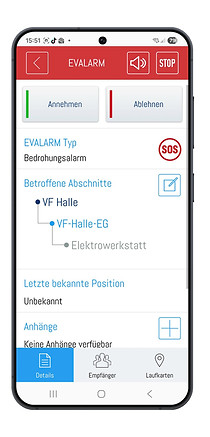

Fastest possible situational overview
Acknowledge alarms
(accept or decline)
and detailed information
Detect reporting location and GPS position in real time
In threatening situations, it is not only crucial that an alarm has been triggered, but also to know where the affected person is located .
EVALARM provides this information in real time and helps those in charge to assess the situation more quickly and react in a targeted manner.
For stationary emergency buttons, EVALARM knows the location within the building. The reporting location can be displayed on an overview plan or a geo-map, so that security personnel, crisis teams, reception, or the control center can immediately see in which area the alarm was triggered.
Both mobile emergency buttons and the mobile app can transmit the GPS location. This makes EVALARM suitable for mobile applications, outdoor areas, campuses, factory premises, or situations where at-risk individuals are not at a fixed workplace.


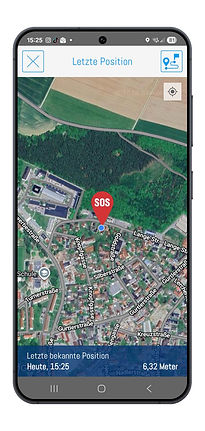
Alarm details:
Recipients see all relevant information.
Alarm details
Reporting location within the building:
Alarm position directly visible in the building plan
GPS position:
GPS location tracking in real time
-
Push notifications via smartphone and desktop - additional channels such as SMS, call or email
-
Feedback and acknowledgments from recipients
-
Escalation if there is no response
-
Targeted information instead of uncontrolled mass alerting
-
Alerting based on role, group, location or scenario

Building plan
GPS tracking
Real-time display
Control center capable
Clear instructions for those affected and emergency teams.
Depending on the type of alarm, role and situation, EVALARM provides the appropriate instructions for action.
-
Display of the incident location on floor plans
-
GPS position display for outdoor areas
-
Acknowledgment and status display of the emergency team and key personnel
3. Orientation
-
Display of the incident location on floor plans
-
GPS position display for outdoor areas
-
Acknowledgment and status display of the emergency team and key personnel
-
Display of the incident location on floor plans
-
GPS position display for outdoor areas
-
Acknowledgment and status display of the emergency team and key personnel

3. Orientation
-
Display of the incident location on floor plans
-
GPS position display for outdoor areas
-
Acknowledgment and status display of the emergency team and key personnel
1

alarm
trigger
The alarm is triggered via emergency button, app, PC or interface.
2

Alert recipients
The emergency team (security service, reception, gate, management, control center, executives, employees) will be informed according to the alarm plan.
3

Show reporting location
EVALARM displays the location of the incident on building plans or the GPS position.
4

Coordinate measures
Recipients provide feedback, receive instructions, and update the situation status.
5

Document
and conclude
Alle Alarmierungen, Rückmeldungen und Maßnahmen werden automatisch dokumentiert und nachvollziehbar gespeichert.
Structured processes - Fast help - Greater security
EVALARM supports you in every phase of a threat alert - reliably GDPR compliant and ready for use 24/7.
Threat situations require rapid and targeted alerting.
In a threat situation, a simple message is often not enough. Those in charge need to know where the alarm was triggered, who was informed, and what measures were taken.
EVALARM helps organizations to handle threat situations in a structured way – from triggering the alarm to alerting, escalating, and documenting.

Industries & Logisitics
Threats in production, logistics and factory areas.

Citizen's Office
Aggressive individuals, threats or attacks on employees.

Schools & Universities
Incidents of violence, threats, or rampage situations.


Clinics & Healthcare
Schutz von Mitarbeitenden bei Übergriffen und Bedrohungen.

Critical infrastructures
Security-relevant events requiring increased protection.
6. Escalate & De-escalate
-
Escalation in severe / life-threatening situations
-
Automatic involvement or alerting of additional emergency services
-
De-escalation after stabilization
-
Return to normal operations
Anforderung | Einfache Alarm-APP | EVALARM |
|---|---|---|
Stiller Alarm | teilweise | je nach Szenario konfigurierbar |
GPS-Position | teilweise | bei mobilen und stationären Notfall-Buttons möglich |
Eskalation | häufig manuell | manuell, automatisiert und regelbasiert |
Leitstellenanbindung | meist nicht vorgesehen | optional mit Pay-on-Demand möglich |
Meldeort im Gebäude | oft nicht vorhanden | über stationäre Buttons und Übersichtsplan möglich |
Handlungshinweise & Aufgabenlisten | einfache Nachricht | rollen- und szenariobasiert |
Alarm auslösen | möglich | per App, Button, Desktop, Web Client oder API |
Rollenbasierte Alarmierung | eingeschränkt | nach Gruppen, Rollen, Standorten und Szenarien |